

All About The New Facebook Business Page Experience
The new Page experience is a way for public figures, businesses and others who want to build and connect with an audience to manage their professional presence on Facebook.
When you switch to the new Page experience, all Page content, including posts, photos, videos, stories and groups that your Page is an admin of, will automatically move to your new Page. All of your Page followers will also be transitioned to your new Page. If your Page has a blue verification tick, it will transfer to your new Page.
What’s new for Pages?
-
A redesigned Page layout that’s cleaner and more intuitive
-
Easy switching and navigation between a public-facing Page and an individual profile. Manage your Page and profile separately.
-
Seamless interactions with other public figures, brands and people via access to Feed: Follow other public figures, brands and partners to create a Feed with topics that matter to you. Stay up to date and connect with people and content on your new Page Feed.
-
Your new Page Feed will be separate from your profile. You can follow different Pages and profiles to curate a unique experience for your Feed on the new Page. Anyone with full control will see this Feed.
-
-
Actionable insights and more relevant notifications
-
Updated Page management tools: You can give others Facebook access or task access to manage the Page.
What features will I have access to with a new Page?
Anyone who was previously an admin on the Page will retain Facebook access after transitioning to the new Page experience. If you have Facebook access of a new Page, you will have access to the following:
-
Settings: Manage and edit all settings, such as Page info and deleting the Page.
-
Permissions: If you have Facebook access with full control, you can give Facebook access or task access to your new Page to help manage it.
-
Content: Create, manage or delete any content on the Page, such as posts, stories and more.
-
Messages: Respond to direct messages as the Page in Inbox.
-
Community activity: Remove and respond to comments, remove unwanted comments and report activity on the Page.
-
Ads: Create, manage and delete ads on all platforms.
-
Insights: Use Page, post and ad insights to analyse the performance of the Page.
-
Instagram account linking: Link your new Page with your Instagram account to manage communication, crosspost and run ads across both platforms.
-
Monetisation and advertising: Use tools to help monetise content that you create. Create and manage ad campaigns using your new Page and Ads Manager.
-
Ability to manage the Page from all platform tools (including Meta Business Suite, Ads Manager, Creator Studio)
-
If you’re granting task access to others, you can choose which features they can manage (e.g. ads, insights, content).
Anyone who was not previously an admin or editor on the Page (such as moderator or advertiser) will have task access to the Page. If you have task access to the Page, you will not be able to switch into the new Page on Facebook. Instead, you can use other platforms from Facebook to manage the features that you have access to. Learn more about task access.
Will I lose access to features or tools from my classic Page?
-
Page likes: If someone likes your Page and is also a follower, they will still follow your new Page.
-
If someone only likes your Page but does not follow it as well, these likes will not transition to your new Page. Learn more about likes and follows.
-
-
Classic Page roles, such as moderator and editors, will not be available at this time
-
You can give Facebook access or task access to your new Page to help manage it
-
-
Publishing tools, such as scheduled posts
-
You can schedule posts from Meta Business Suite or Creator Studio.
-
-
Business features, such as jobs, appointments and offers
-
Classic Page features, such as reviews, check-ins and Page templates
-
Manage from mobile web browsers: You can manage the new Page from the Facebook mobile app, but not from mobile web browsers.
For more information, please click here.
Further Information
If you’d like to speak to us regarding our ability to design you a quality website or perhaps how to maximise the potential of your existing website, please give us a call on 01883 372488 or contact us via Facebook and we’ll be happy to talk you through your options.
Currently Browsing: All About The New Facebook Business Page Experience
Get Started With The New Facebook Pages Experience
Before you begin
- You must have Facebook access of a new Page to switch into it.
Switch into your new Page (desktop)
To switch into your new Page:https://www.footprint.co.uk/uncategorized/get-started-with…pages-experience/
- Open your home page.
- Click on your profile picture in the top right.
- Select Switch profile.
- Select the new Page that you want to open.
Switch into your new Page (mobile)
To switch into your new Page:
- Open your Facebook app.
- Tap on your profile picture in the bottom right.
- Under your name, tap on the new Page that you want to open.
This will switch into and open your new Page.
Note: If you have Facebook access of a new Page, you can switch into it on Facebook. If you have task access to a new Page, you can manage it from other tools, such as Meta Business Suite or Creator Studio.
What is the difference between followers and likes?
-
The number of followers indicates the number of people who may see your Page’s updates and posts in their Feed. When people like your Page, they also automatically “follow” you, which allows them to see your posts in Feed. People who like the Page can also choose to unfollow the Page and not see its posts in their Feed. They still demonstrate their support.
-
For a stronger indicator of the number of people who would like to see your Page’s posts in their feed, using followers is a better signal.
Further Information
If you’d like to speak to us regarding our ability to design you a quality website or perhaps how to maximise the potential of your existing website, please give us a call on 01883 372488 or contact us via Facebook and we’ll be happy to talk you through your options.
Currently Browsing: Get Started With The New Facebook Pages Experience
Introducing the New Facebook Pages Experience
The redesigned Facebook Pages experience makes it simpler for public figures and creators to build community and achieve their business objectives.
What’s New:
- Redesigned layout that’s simpler and more intuitive
- Dedicated News Feed to discover and join conversations, follow trends, interact with peers and engage with fans
- Easy navigation between personal profile and Pages
- Updated task-based admin controls giving trusted Page admins full control or partial access
- Actionable insights and more relevant notifications
- Safety and integrity features to detect spammy content and impersonator accounts
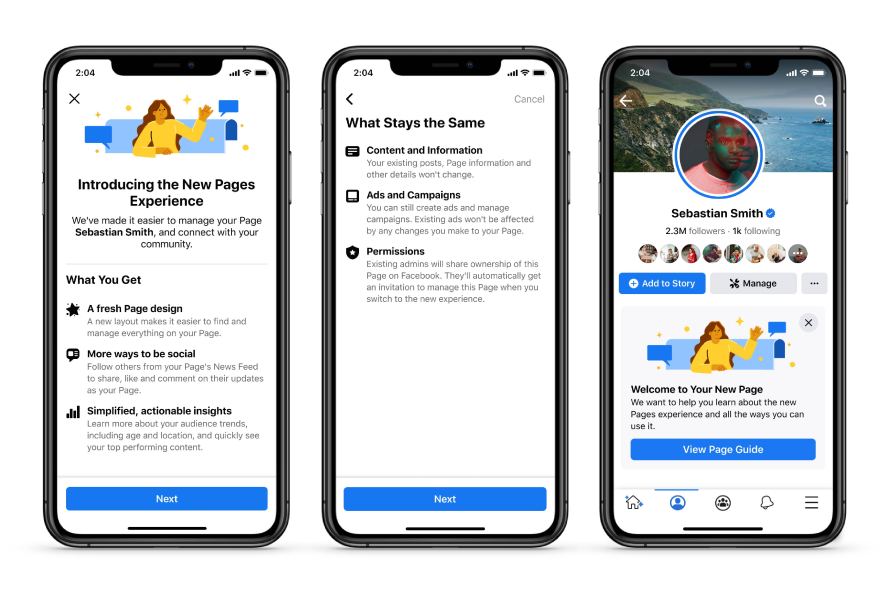
Simple and Intuitive Page Design
Now it’s easy to navigate between a personal profile and public Page. We’ve redesigned the look and feel to be cleaner and more streamlined than before — including making it simple for people to see bios, posts and other important info.
Dedicated News Feed and New Ways to Engage
We are bringing the power of News Feed to Pages for the first time. Now Pages can discover and join conversations, follow trends, interact with peers and engage with fans. The dedicated News Feed will also suggest new connections — other public figures, Pages, Groups and trending content that a Page or public figure cares about.
To make Page conversations more visible to a wider audience and surfaced more frequently in their followers’ News Feed, comments from public figures will be bumped to the top of the comments section. People will also be able to follow Pages directly from comments and recommendations posts.
New Q&A Format
To support richer, interactive conversations, we are also introducing a new text-based Q&A format.
Focus on Page Followers
We are removing Likes and focusing on Followers to simplify the way people connect with their favourite Pages. Unlike Likes, Followers of a Page represent the people who can receive updates from Pages, which helps give public figures a stronger indication of their fan base.
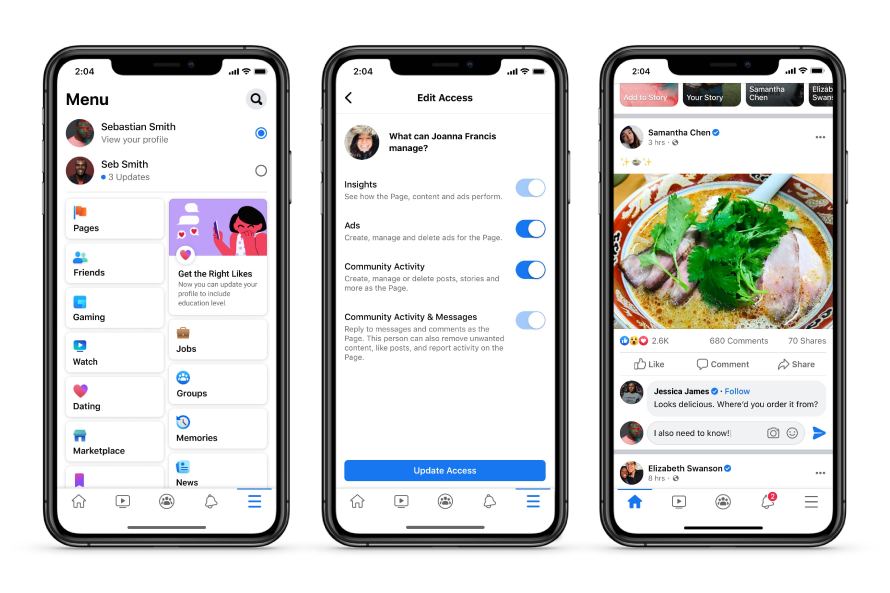
Improved Page Management Tools
We’ve added new Page management features — like the ability to more clearly assign and manage admin access permissions based on specific tasks. For example, you’ll now be able to grant varying levels of access to manage specific tasks including Insights, Ads, Content, and Community Activity & Messages. This will also ensure account safety and integrity.
Safety and Integrity Features
We want Facebook to be a safe place to connect with fans, so we’ve improved our ability to detect activity that isn’t allowed on our platform including hate speech, violent, sexual or spammy content and impersonation. We are continuing to expand the visibility of a verified badge to make it easier to identify posts and comments from authentic Pages and profiles. A verified Page’s comment on another Page’s public post, may appear higher in the comments section and be visible in News Feed.
Further Information
If you’d like to speak to us regarding our ability to design you a quality website or perhaps how to maximise the potential of your existing website, please give us a call on 01883 372488 or contact us via Facebook and we’ll be happy to talk you through your options.

