

How To Setup An Email Account On Your iPhone or iPad
There are two ways you can set up an email account in the Mail app on your iOS device – automatically or manually. Find out which option is best for you.
How to set up your email account automatically
If you’re using an email provider such as iCloud, Google or Yahoo, Mail can set up your email account automatically with just your email address and password. Here’s how:
- Go to Settings > Mail, then tap Accounts.

- Tap Add Account, then select your email provider.
- Enter your email address and password.
- If you see Next, tap it and wait for Mail to verify your account.
- If you see Save, tap it.

If you can’t see your email provider, tap Other to add your account manually.
How to set up your email account manually
If you need to set up your email account manually, make sure you know the email settings for your account. If you don’t know them, you can look them up or contact your email provider. Then follow these steps:
- Go to Settings > Mail, then tap Accounts.
- Tap Add Account, tap Other, then tap Add Mail Account.
- Enter your name, email address, password and a description for your account.
- Tap Next. Mail will try to find the email settings and finish setting up your account. If Mail finds your email settings, tap Done to finish the account setup process.
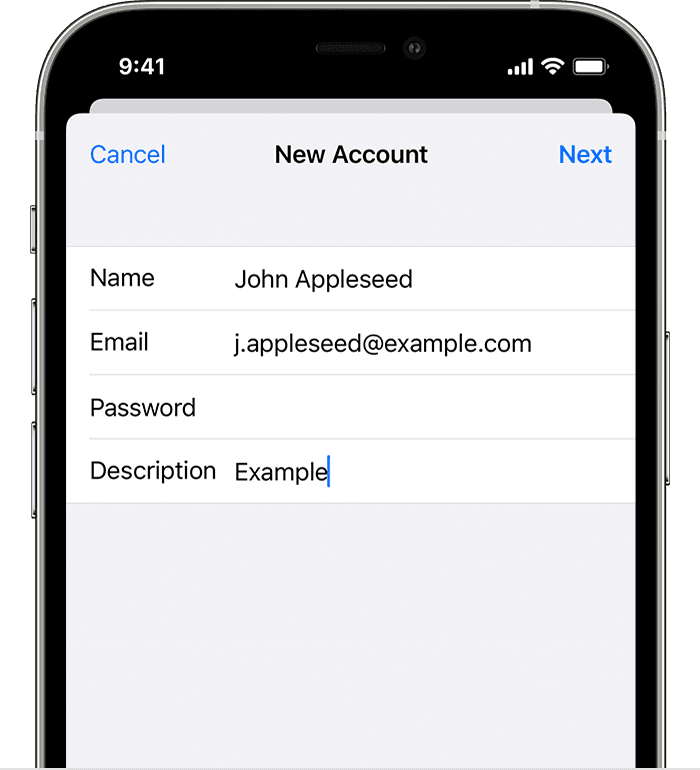
Enter account settings manually
If Mail can’t find your email settings, you will need to enter them manually. Tap Next, then follow these steps:
- Choose IMAP or POP for your new account. If you’re not sure which one to choose, contact your email provider.
- Enter the information for Incoming Mail Server and Outgoing Mail Server. Then tap Next. If you don’t have this information, try looking it up.
- If your email settings are correct, tap Save to finish. If the email settings are incorrect, you’ll be asked to edit them.

If you still can’t set up your email account or save your email settings, give us a call and we’ll give you a helping hand.
Further Information
If you’d like to speak to us regarding any of our services, including our online marketing services, please give us a call at 01883 372488 or contact us via Facebook and we’ll be happy to talk you through your options.
Currently Browsing: How To Setup An Email Account On Your iPhone or iPad
How To Setup An E-Mail Account On Your Phone
One of our most commonly received questions relates to setting up or adding an e-mail account to your phone.
The good news is that whilst this may seem complicated, it’s really not. Following the 3 steps outlined in the images below will allow you to take the steps necessary to add your e-mail account to your phone.
This guide details how to add email to your phone. Whilst the process is similar on all iPhones, there may be a few subtle differences that you should bear in mind while going through the process.
Step 1

Step 2

Step 3
Further Information
If you’d like to speak to us regarding any of our services, including our online marketing services, please give us a call at 01883 372488 or contact us via Facebook and we’ll be happy to talk you through your options.
Currently Browsing: How To Setup An E-Mail Account On Your Phone
Leave The Hard Work To Us!
The majority of work relating to websites and online marketing can be tricky and time-consuming. From managing and updating your website to sending out regular Social Media updates, it takes time, effort and a level of knowledge that few people actually have to make this work.
Below we have outlined 3 of the main reasons we believe outsourcing work to a reputable digital agency (such as ourselves!) is the right thing to do.
Reason No. 1 – It’s A Specialist Service
There is absolutely no shame in not knowing everything about everything! If you have to take the time to train a member of staff to learn all the intricacies of website management and Social Media campaigns, is it really worth the expense?
Simple economics highlight the fact that it’s nearly always far more economical for agencies to pay for the best digital marketing software and services.
Whilst most businesses can gain access to almost any online tool, digital agencies are able to offer the chance to tap into the best-in-class tools due to those same tools being used across a large array of clients.
Reason No. 2 – Freeing Up Time
All businesses are faced with an issue that there is simply no way to overcome – there are only so many hours in the day! Staying up to date with essential work can be tough enough and when adding additional work into the mix, something has to give.
By outsourcing work such as website maintenance, SEO, Social Media management and content creation. You can then can focus on the aspects of your work which must have your regular attention.
Reason No. 3 – A Fresh Perspective
A fresh pair of eyes can be important at all times. The truth is that your own personal perspective of your business and reality may not be the same thing. Sometimes, a fresh pair of eyes and some outside input can be just what is needed to help ensure your business becomes even more productive and ready to take the leap to the next level.
An agency such as Footprint Digital can help deliver a clear and fresh perspective of any business.
Further Information
Footprint specialises in creating bespoke websites designed to help take your business to another level. We have been providing web design Surrey since 1998 and if you’d like to speak to us regarding any of our services, give us a call at 01883 372488 or contact us via Facebook and we’ll be happy to talk you through your options.

