

Setting up an automated email signature (following on from last week’s blog) probably sounds like a tiny job; why bother, right?
Well it is, it will take 5 minutes, but it’s one of those little jobs that will lend a bit more weight to your business emails. They’ll look that bit more professional, which is always vital when you’re in the market of building trust with customers/investors/etc.
These instructions will show you how to create a default signature in Outlook 2007, the most commonly used email programme at the moment:
1 Create signature
- In a new message, on the Message tab, in the Include group, click Signature, and then click Signatures.
- On the E-mail Signature tab, click New.
- Type a name for the signature, and then click OK.
- In the Edit signature box, type the text that you want to include in the signature.
- To format the text, select the text then use the style and formatting buttons to select the options you want

6. After you finish creating the signature, click OK.
NOTE The signature that you just created or modified won’t appear in the currently open message; it must be inserted into the message.
2 Inserting a signature into a message automatically
- In a new message, on the Message tab, in the Include group, click Signature, and then click Signatures.
- Under Choose default signature, in the E-mail account list, click an e-mail account with which you want to associate the signature.
- In the New messages list, select the signature that you want
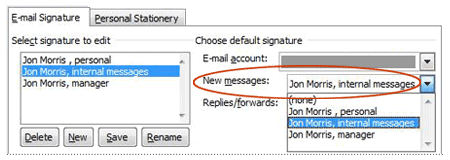
- If you want a signature to be included in message replies and in forwarded messages, in the Replies/Forwards list, select the signature. If not, select none.
- Click OK
Further Information
Footprint specialise in creating bespoke websites designed to help take your business to another level. If you’d like to speak to us regarding any of our services, give us a call on 01883 372488 or contact us via Facebook and we’ll be happy to talk you through your options.
Author: Jenni McCarthy
