

How To Add A BCC To An Outlook E-Mail
Have you ever noticed that you can see all the recipients of any e-mail that you receive? What happens if you would rather that was not the case when you send an e-mail? If you have an e-mail to send out and would prefer for everyone receiving it not to know all the recipients, the Bcc (blind carbon copy) function is here to help.
Below we have an easy to follow guide which will show you how to Bcc people into the e-mail you wish to send.
If you add a recipient’s name to the Bcc box in an email message, a copy of the message is sent to the recipient that you specify. Any recipients added to the Bcc box will not be shown to any other recipients who receive the message.
Outlook for Windows
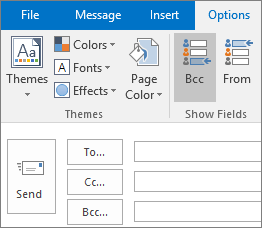
After you turn on the Bcc box, it appears every time you create a message until it’s turned off. The option to turn on the Bcc field can be found in two locations, depending on whether you are composing a new message or replying to or forwarding a message.
- Create a new email message or reply to or forward an existing message.
- If the message you’re composing opens in a new window, select Options > Bcc.

If the message you’re composing opens in the Reading Pane, select Bcc from the ribbon.
- In the Bcc box, add recipients, compose the message, and choose Send when done.
Turn off Bcc
You can turn off the Bcc box for future messages at any time.
- Create a new email message or reply to or forward an existing message.
- If the message you’re composing opens in a new window, select Options > Bcc.
If the message you’re composing opens in the Reading Pane, select Bcc from the ribbon.
Note: The background colour distinguishes between the Bcc button being turned on or turned off. A dark background means the button is turned on, and a light background means it’s turned off.
View Bcc recipients
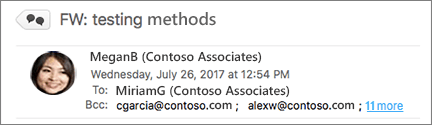
If you’re the recipient of a message, you can’t see whether the sender added Bcc recipients. Only the sender of a message can see the names of Bcc recipients by opening a message in the Sent Items folder where all sent messages are stored by default.
- In the Sent Items folder, open the message that you sent.
- In the Reading Pane, view the header section of the message.
Outlook for Mac
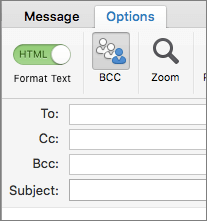
After you turn on the Bcc box, it appears every time you create a message until it’s turned off.
- Create a new email message, then click Options > Bcc.
- In the Bcc box, add recipients, compose the message, and choose Send when done.
Turn off Bcc
You can turn off the Bcc box for future messages at any time.
- Create a new email message, then choose Options >Bcc.
Note: The background colour distinguishes between the Bcc button being turned on or turned off. A dark background means the button is turned on, and a light background means it’s turned off.
View Bcc recipients
If you’re the recipient of a message, you can’t see whether the sender added Bcc recipients. Only the sender of a message can see the names of Bcc recipients by opening a message in the Sent Items folder where all sent messages are stored by default.
- In the Sent Items folder, open the message that you sent.
- In the Reading Pane, view the header section of the message.
Contact Us
If you would like to put your online marketing in the hands of a company who will take it forward, please contact Footprint Web Design on Tel. No. 01883 372488 today.
Currently Browsing: How To Add A BCC To An Outlook E-Mail
Are You Posting Through GMB?
There can be little doubt that Google My Business (GMB) offers one of the most powerful tools in the local SEO arsenal and is a great way to improve online visibility.
If you are a business which places great importance on its local area, ensuring you have a verified GMB profile should be the very first step that you take to maximise your online presence. So long as you comply with Google’s guidelines, your GMB profile will provide free (for the moment!) exposure on Google’s search engine so why wouldn’t you do it???
Not only will potential customers receive an easy access to key snippets of information like your name, address and phone number, they will also be able to see any images you post, any reviews that are left and a whole host of other snippets of relevant information, all without even needing to visit your website.
Does GMB help with local rankings?
Not only is your GMB Profile easily visible to potential customers when they search on Google, but Google My Business is also a key Google local ranking factor. In fact, according to local ranking factor industry research, Google My Business “signals” is the most important ranking factor for local pack rankings. Google My Business signals had a significant increase in ranking importance between 2017 and 2018 — rising from 19% to 25%.
For more on this study, please click here.
Please Note – It’s crucial to ensure that someone regularly logs into your GMB dashboard. Google will often very helpfully (not always!!) try to make subtle updates to your listing in an effort to increase its accuracy. However, these auto-generated updates are not always as accurate as you would like and it’s important that you are aware of these to allow you to opt-out of adding information which is incorrect to your profile.
Is claiming my listing enough?
Claiming your Google My Business profile is, without doubt, the first and most important step. Don’t stop there though! The option to publish posts through the dashboard can play a crucial role in helping to communicate with your potential customers and keep your profile fresh and up to date.
Contact Us
If you would like to put your social media requirements in the hands of a company who will take it forward, please contact Footprint Web Design on Tel. No. 01883 372488 today.
Currently Browsing: Are You Posting Through GMB?
Does Your Business Have An App Yet?
Apps are the new face of eCommerce in the UK. The good news is that apps can be more cost-effective and cloud-friendly compared to many other current alternatives.
Don’t Miss Out On This Much Web Traffic!
A recent study* highlighted the fact that mobile devices now account for well over 50% of all web traffic and this figure is projected to continue rising steadily in the near future.
Therefore the best way for businesses to reach consumers is by adopting a mobile-first approach on all web-based activities. This includes developing and deploying apps for smartphones and tablets as well as responsive websites that can render well, irrespective of screen size.
We’re passionate about creating useful, user-friendly apps that provide our customers with great ROI and which take your customer’s experiences to new levels.
We can create apps for:
- Apple iOS – iOS Development is one of the core strengths of the Footprint app development team. Our highly skilled team are knowledgeable about all things iOS.
- Android – Android is currently the most popular mobile platform and covers a very large range of devices. Our team is ideally placed to help develop and launch your Android App.
- html5– HTML5 and Hybrid Apps offer a cost-effective middle ground between mobile websites and native apps.
Innovative, Reliable, And Attractive
Our ability to create effective mobile applications represents the cutting edge of modern web design technology. Every app designed and developed by the Footprint team is created to be reliable, user-friendly and fast.
We guarantee that your app will work flawlessly as well as offering an enticing aesthetic appeal which is known to be very attractive to the modern-day user.
Whether you require an iOS, Android, or Windows app, our team has the experience, knowledge, and skills required for the job.
The Future of E-Commerce
Research carried out by IMRG and Capgemini in 2015*, found that mobile commerce accounts for 51% of all eCommerce sales in the UK. Moreover, data from a report published by Yodel shows that 76% of consumers in the UK purchase their Christmas presents online. Most of these sales occur via dedicated apps, meaning the development of your own app can offer a cost-effective way of boosting revenues while growing brand reaches at the same time. Businesses that fail to take advantage of this opportunity risk losing their market share to competitors who have invested in mobile commerce.
The Perfect Solution!
Thanks to advances in cloud-computing technology, the cost of mobile app development has dropped significantly since the dotcom era. As such, entrepreneurs running start-ups and SMBs, all the way to multi-national companies have the ability to turn to us to develop mobile apps that suit their needs for as little as a few hundred pounds.
Contact Us Today
If you would like to speak to our dedicated team regarding the development of an app for you, please contact us today on Tel. No 01883 372488.
Currently Browsing: Does Your Business Have An App Yet?
Sources
* http://marketingland.com/mobile-top-sites-165725
* http://ecommercenews.eu/51-uk-ecommerce-happened-via-mobile/

