

Helping Your Business To Move With The Times
Every business owner should have the goal of reaching page one on Google for terms relating to their products and services. The importance of being easily found on the internet couldn’t be any higher and whilst it can be tough to get there, once you are there SEO can become the investment that just keeps on giving.
There are a variety of external factors which are likely to determine just how difficult it will be to achieve a good ranking for a website and these factors are likely to vary greatly from business to business and sector to sector.
Although some competitive industries may require a larger SEO budget to achieve their desired results, through wise investment, many small businesses will be able to obtain the benefits of effective SEO which can make a significant difference to their business.
Small businesses may have even more to gain by the 4 benefits outlined below:
- Increased conversion rates (customers spending more money!!)
- Creating increased trust with your clients
- Advertising that keeps on giving (unlike some forms of advertising such as leaflet and newspaper advertising, SEO is designed to keep on giving)
- Increased feedback (the ability to leave reviews can be key in opening lines of communication with your customers)
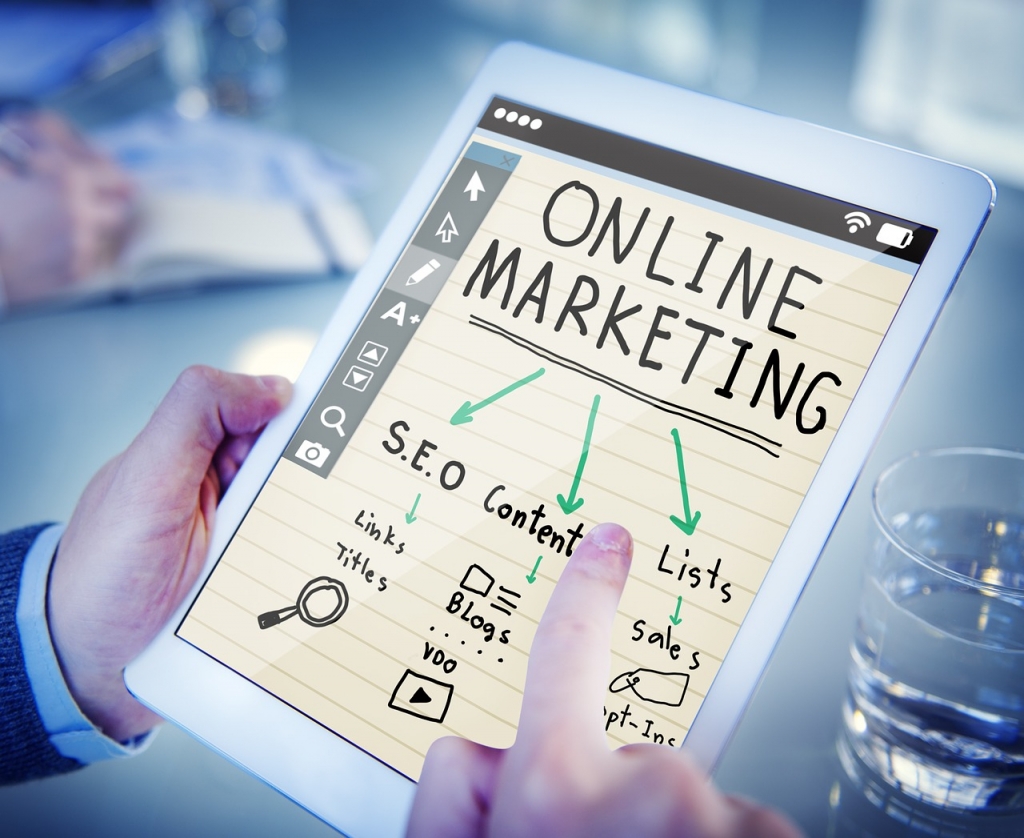
Moving With The Times
Do you think that your website is performing as well as it could? Whilst SEO can certainly help any company looking to help make the most from their website, it’s not just limited to big businesses.
Unlike some traditional methods of advertising such as newspaper adverts or flyers, whilst an organic and well-planned SEO strategy can take a period of time to put into place, once the results start to come in, there is no upper limit to how great your ROI may become.
Depending on the type of business you run, the implementation of SEO does not have to cost a small fortune. Even small businesses which have a limited marketing budget will get effective help from SEO when it comes to increasing their visibility, rankings and more importantly, leads.
Further Information
If you’d like to speak to us regarding our ability to design you a quality website or perhaps how to maximise the potential of your existing website, please give us a call on 01883 372488 or contact us via Facebook and we’ll be happy to talk to you through your options.
Currently Browsing: Helping Your Business To Move With The Times
How To Create A Facebook Event
Facebook events offer a great way to promote an upcoming (both virtual and in-person) event. Facebook users can discover these events through invites from their friends, engagement from friends, or suggestions made by the website itself. Events make it easier to share information about both one-time programs and recurring ones.
Facebook events give your in-person and virtual events a presence on Facebook. Businesses can use Facebook events for comedy and music performances, sporting events, tours, upcoming product releases, sales events and trade shows, fundraisers and more. After creating an event, you can use event ads to promote your events in Facebook News Feed in order to drive attendance and increase ticket sales.
You can use event ads to:
-
Increase awareness of your event. Create an event ad so your audience can learn about your upcoming event.
-
Get RSVPs on Facebook. Encourage people to respond to your event so they receive updates and reminders.
-
Sell more tickets. Reach people who may be interested in your event or retarget people who have expressed interest or attended similar events in the past.
You can create event ads in Ads Manager or by boosting an event from your Facebook Page.
When do businesses use Facebook events?
- Host an event to drive foot traffic to your business – Increase attendance at events such as monthly open mic nights at your café, a special New Year’s dinner at your restaurant and trunk shows at your boutique.
- Set up an event to connect with your community – Raise awareness for events such as community meetings, fundraiser gatherings for your cause and street parties.
- Post an event to share with your fans – Keep your friends, family and fans updated on upcoming concerts or performances, the opening night of your film screening or play and new exhibitions or art openings.
What type of information can be included?
- Include basic event info – Add a specific location, date and time. The address enables attendees to see a map with the event location and get directions.
- Share the key details – The category, description and keywords can generate interest by telling people what your event is all about.
- Enlist co-hosts and groups to promote it – Ask other organisers or promoters to add your event to their Page calendars so that their audiences can discover your event. Once a few people are listed as attendees, the event can spread organically.
- Include a ticket link – Let people know where they can get tickets for your event, if applicable. You can also connect your ticketing platform with Facebook.
Need Some More Help
Would like to find out more about setting up a Facebook event? Give the Footprint Digital team a call on Tel. No. 01883 372488 today.
Currently Browsing: How To Create A Facebook Event
How To Add An Email Account To Outlook
These steps are the same whether you’re adding your first email account or additional email accounts to Outlook.
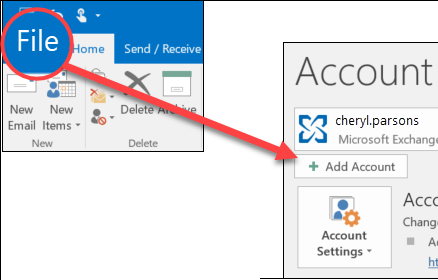
- Select File > Add Account.

- What you see next depends on your version of Outlook.
For Outlook for Microsoft 365 and Outlook 2016
For Outlook 2013 and Outlook 2010
Enter your email address and click Connect.
Enter your name, email address, and password, and click Next.
- If prompted, enter your password again, then select OK > Finish to start using your email account in Outlook.
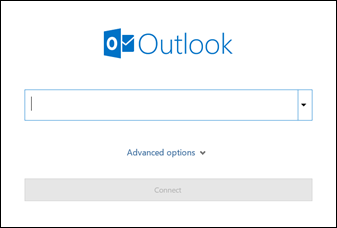 Enter your email address and click Connect.
 Enter your name, email address, and password, and click Next.
Outlook won’t accept my password
If Outlook won’t accept your password and you know you’re using the password for your email account, you might have an email account that requires additional security.
Gmail, Yahoo, iCloud, Outlook.com, and AOL accounts all use two-factor authentication to help verify that you’re the person trying to access your email account.
To add your email account to Outlook, you’ll need an app password, also known as an application password. This is a different password than your regular email account password. One way you’ll know you need an app password is if you see the following message: 2-factor authentication is set up for your account. Please sign in using your application password.
The steps to obtain an app password are different for each email provider. Select your provider in the drop-down for instructions.
Use advanced setup to add a POP or IMAP email account in Outlook for Windows
If you need to enter specific values for incoming and outgoing server names, port numbers, or SSL settings, you can use Outlook’s advanced setup option. You can use these instructions to add a POP or IMAP account to Outlook.
- Open Outlook and select File > Add Account.
- On the next screen, enter your email address, select Advanced options, then check the box for Let me set up my account manually and select Connect.
- Select your account type. Most of the time when you need to use this option, you’ll select IMAP.
- The Account settings screen should be pre-populated with most of the account settings you need. However, if you need to look up your settings, see the POP and IMAP account settings topic. Enter your incoming and outgoing server settings and then select Next.
- Enter your password and then select Connect.
Use advanced setup to add a third-party MAPI email account to Outlook for Windows
If you are using a third-party MAPI provider, download and configure the MAPI email provider application as suggested by provider company.
- Open Outlook and select File > Add Account.
- On the next screen, enter your email address, select Advanced options, check the box for Let me set up my account manually, and select Connect.
- On the Advanced Setup screen, select Other.
- On the Other screen, choose the type of server to connect to from the list.
Note: The Other option and your account type listed under it will only appear if you’ve properly installed and configured the MAPI provider. - Click Connect.
- The third-party MAPI provider application installed on your machine should launch.
- Finalize the account setup by following the MAPI provider’s instructions.
Further Information
If you’d like to speak to us regarding any of our services, please give us a call on 01883 372488 or contact us via Facebook and we’ll be happy to talk you through your options.

