

Get Started With The New Facebook Pages Experience
Before you begin
- You must have Facebook access of a new Page to switch into it.
Switch into your new Page (desktop)
To switch into your new Page:https://www.footprint.co.uk/uncategorized/get-started-with…pages-experience/
- Open your home page.
- Click on your profile picture in the top right.
- Select Switch profile.
- Select the new Page that you want to open.
Switch into your new Page (mobile)
To switch into your new Page:
- Open your Facebook app.
- Tap on your profile picture in the bottom right.
- Under your name, tap on the new Page that you want to open.
This will switch into and open your new Page.
Note: If you have Facebook access of a new Page, you can switch into it on Facebook. If you have task access to a new Page, you can manage it from other tools, such as Meta Business Suite or Creator Studio.
What is the difference between followers and likes?
-
The number of followers indicates the number of people who may see your Page’s updates and posts in their Feed. When people like your Page, they also automatically “follow” you, which allows them to see your posts in Feed. People who like the Page can also choose to unfollow the Page and not see its posts in their Feed. They still demonstrate their support.
-
For a stronger indicator of the number of people who would like to see your Page’s posts in their feed, using followers is a better signal.
Further Information
If you’d like to speak to us regarding our ability to design you a quality website or perhaps how to maximise the potential of your existing website, please give us a call on 01883 372488 or contact us via Facebook and we’ll be happy to talk you through your options.
Currently Browsing: Get Started With The New Facebook Pages Experience
Introducing the New Facebook Pages Experience
The redesigned Facebook Pages experience makes it simpler for public figures and creators to build community and achieve their business objectives.
What’s New:
- Redesigned layout that’s simpler and more intuitive
- Dedicated News Feed to discover and join conversations, follow trends, interact with peers and engage with fans
- Easy navigation between personal profile and Pages
- Updated task-based admin controls giving trusted Page admins full control or partial access
- Actionable insights and more relevant notifications
- Safety and integrity features to detect spammy content and impersonator accounts
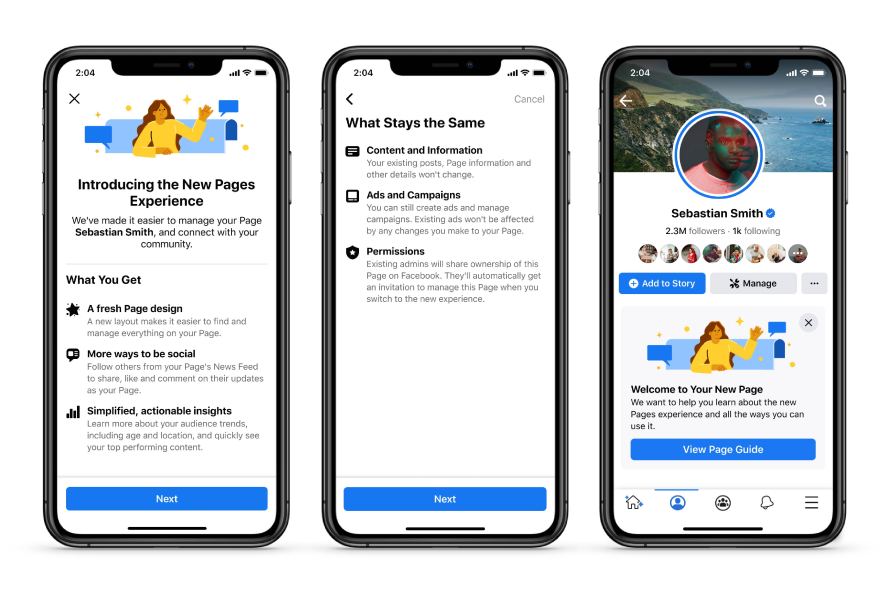
Simple and Intuitive Page Design
Now it’s easy to navigate between a personal profile and public Page. We’ve redesigned the look and feel to be cleaner and more streamlined than before — including making it simple for people to see bios, posts and other important info.
Dedicated News Feed and New Ways to Engage
We are bringing the power of News Feed to Pages for the first time. Now Pages can discover and join conversations, follow trends, interact with peers and engage with fans. The dedicated News Feed will also suggest new connections — other public figures, Pages, Groups and trending content that a Page or public figure cares about.
To make Page conversations more visible to a wider audience and surfaced more frequently in their followers’ News Feed, comments from public figures will be bumped to the top of the comments section. People will also be able to follow Pages directly from comments and recommendations posts.
New Q&A Format
To support richer, interactive conversations, we are also introducing a new text-based Q&A format.
Focus on Page Followers
We are removing Likes and focusing on Followers to simplify the way people connect with their favourite Pages. Unlike Likes, Followers of a Page represent the people who can receive updates from Pages, which helps give public figures a stronger indication of their fan base.
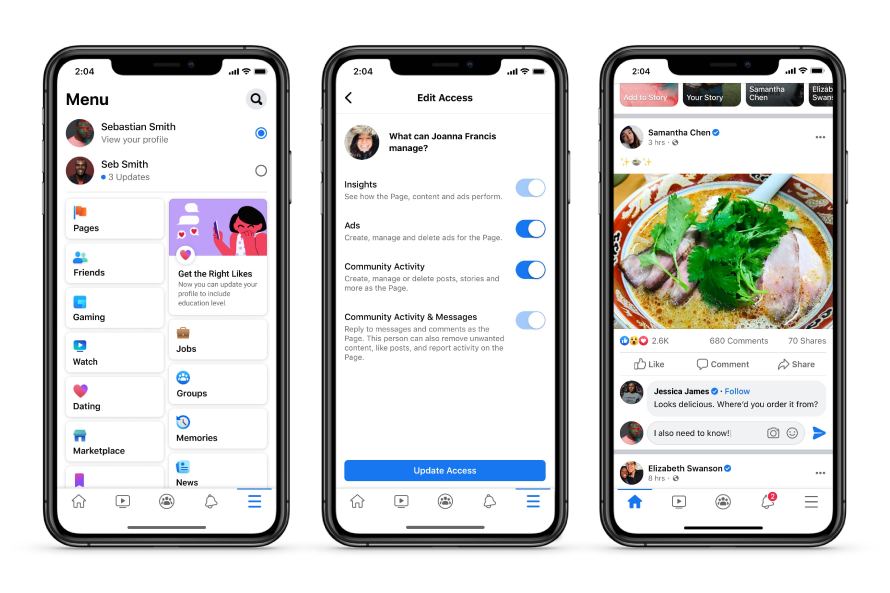
Improved Page Management Tools
We’ve added new Page management features — like the ability to more clearly assign and manage admin access permissions based on specific tasks. For example, you’ll now be able to grant varying levels of access to manage specific tasks including Insights, Ads, Content, and Community Activity & Messages. This will also ensure account safety and integrity.
Safety and Integrity Features
We want Facebook to be a safe place to connect with fans, so we’ve improved our ability to detect activity that isn’t allowed on our platform including hate speech, violent, sexual or spammy content and impersonation. We are continuing to expand the visibility of a verified badge to make it easier to identify posts and comments from authentic Pages and profiles. A verified Page’s comment on another Page’s public post, may appear higher in the comments section and be visible in News Feed.
Further Information
If you’d like to speak to us regarding our ability to design you a quality website or perhaps how to maximise the potential of your existing website, please give us a call on 01883 372488 or contact us via Facebook and we’ll be happy to talk you through your options.
Currently Browsing: Introducing the New Facebook Pages Experience
Should I Be Using Facebook Ads?
Changes to Facebook’s algorithm now mean that not everyone who follows your page is likely to see all of your updates. This makes it even more unlikely that people who do not follow your page will!
A viable option to break through the glass ceiling does exist though in the form of Facebook’s boosted post facility. Whilst this is, unfortunately, a paid option, as opposed to Google Adwords which still requires people to search for relevant terms before your Ads can appear, boosted posts are pushed onto the timeline of people who fall into your target demographics and therefore offers a pro-active and effective way to target new customers.
A few facts about Facebook Ads.
-
Ads can appear in Feed on desktop, Feed on mobile, and in the right column of Facebook on desktop.
-
Ad content is sometimes paired with news about social actions that your friends have taken, such as liking a Page.
-
Your friends might see news about the social actions that you have taken in Facebook ads. This news will only be shown to your confirmed friends and will adhere to applicable privacy settings that you’ve set for your account. If a photo is used, it’s your profile photo and not a photo from your photo albums.
-
Facebook doesn’t sell your info to advertisers.
-
Facebook actively enforces policies that help protect your experience with third-party apps and ad networks.
Whether you want to target gender, interests, locations, a combination of the three or something completely different, boosted posts will ensure that your chosen post will be seen by a significant number of people who are unlikely to have seen it otherwise.

The ad formats you can use depend on your advertising objective.
Your objective can also affect the placements (Facebook, Messenger, Instagram and Audience Network) where your ads can appear.
- Image – We recommend using images of your product or brand.
- Video – Adding movement to your ads can make them more eye-catching in the Feed.
- Carousel – Carousel ads showcase up to ten images or videos in a single ad, each with its own link.
- Instant Experience – Instant Experience is a full-screen experience that opens after someone taps your ad on a mobile device. Create an Instant Experience to visually highlight your brand, products or services.
- Collection – The collection format features multiple products and opens as an Instant Experience when someone interacts with it. Your customers can discover, browse and purchase products from their phones in a visual and immersive way.
What Are The Benefits Of A Boosted Post?
- Make up for a reduced organic reach. Facebook is on record acknowledging that the organic reach for posts from businesses is declined. Facebook boosted posts offer the chance to overcome that shift.
- Reach a wider, targeted audience. With Facebook boosts, you can target whichever demographic you choose and the visibility of your posts will no longer be limited to those already subscribing to your page.
- Easy to use. The simplified process of boosting posts ensures that you can quickly have posts boosted and live within moments
- Access to analytics. Facebook Insights will allow you to access a detailed summary of the performance of your boosted posts.
Let Us Know What You Think
Would you like to explore the boosted post options? Let us know and we’ll be happy to help. Give us a call on 01883 372488 or contact us via Facebook and we’ll be happy to talk you through your options.

