

Online Marketing – The 3 Key Areas
There’s no room for being shy when it comes to online marketing. With competitors shouting from the rooftops about how their products and services are better than the available alternatives, it’s important to ensure that you making the right noises in the right places about your business.
Below, we have identified 3 of the most important areas to project your message.
No. 1 – Use Social Media To Your Advantage
There can be no escaping the fact that Social Media plays a huge role in the lives of many people.
This fact can help to shape your online marketing strategy and we will help you push your business through all of the primary Social Media channels.
Post about your business, your services, 3rd party stories, your team, your promotions, anything related to your business is fair game and likely to be seen by lots of people.

No. 2 – Don’t Underestimate The Importance of Online Directories
This often comes as a surprise to many people but the importance of online directories should never be overlooked. Whilst it is unlikely that many people with access to a computer would turn to a hard copy of a directory such as the Yellow Pages, online directories are more popular than ever.
Not only does the submission of your business details offer another avenue for customers to visit your website or access your contact details, but it also offers further confirmation to the search engines that your business does everything that you claim. This can be a key factor in helping to push your website and Google Maps listing up the search rankings.
Please Note – Continuity is vitally important. Whilst Google is far more intuitive when it comes to deciphering different snippets of information, even using St and Street on different directories as part of your address can dilute the effectiveness of each citation.
No. 3 – Start Gathering Reviews – Right Now!!!
Reputation means everything for many businesses. In such a competitive world with many businesses offering similar services and competing for the same customers, the level of reviews that you receive can be the difference between a potential customer calling you and calling one of your competitors. So much is taken on trust now and if you have no previous experience with a company, being able to draw on the experiences of past customers can help to provide an insight that can make a difference.
We will help put all the pieces in place to ensure that your reputation can be used to help push you in the right direction!
Contact Us
If you would like a chat about your website, please give the Footprint Web Design team a call on Tel. No. 01883 372488 today.
Currently Browsing: Online Marketing – The 3 Key Areas
Does Your Business Have A Website? 3 Reasons Why It Must!
Would you believe that there are still some businesses out there that do not have a website? I know, crazy isn’t it!? Seriously though, whilst some businesses have made a conscious decision to stay offline, we strongly believe that it is a short-sighted view.
Whether this is because of concerns regarding expensive set-up costs or time-consuming maintenance is a bit of a mystery but the truth is, if your business does not have a website, you are missing out!
Below, we have identified 3 of the main reasons why your business MUST have a website.
It’s The Perfect Shop Window
Even if you do not wish to sell any products online, your website still offers the ideal platform to showcase all of the important pieces of information about your business.
Your website can be tailored to provide your customers with quick and easy access to an array of information including contact details, images, directions, FAQ, terms and conditions along with much more.

It Offers The Form Of Advertising The Just Keeps On Giving
Websites are the form of marketing that just keeps on giving. As opposed to some forms of advertising such as flyers, newspaper ads, radio ads etc, which need a little too much luck to be effective, websites are designed to be accessible at a time when your customers actually need your services.
Providing 24/7 access to your products and services in a convenient fashion simply could not be more effective.
It Allows Easy Targeting Of Your Local Market
There are a variety of facts and figures which highlight that an increasing number of customers are searching for locally based products and services on at least a monthly basis.
Without the presence of a well-optimised website, you are missing out on a huge amount of potential business. Even worse, not only are you not in a position to capitalise on these searches, there is every chance that your competitors will be.
Further Information
If you’d like to speak to us regarding how we can help you to use web design to grow your company, give us a call on 01883 372488 or contact us via Facebook and we’ll be happy to talk you through your options.
Currently Browsing: Does Your Business Have A Website? 3 Reasons Why It Must!
How To Setup An E-Mail Account On a Kindle
Did you receive an Amazon Fire or phone for Christmas? If you did and you’re struggling to set-up your e-mail, the guide below should help.
Email Setup
You’ll need an e-mail account to sync with the Email app on your Fire phone. More than one account can be added, offering combined or single account views. After you set up your e-mail account, it will automatically sync with the Calendar and Contacts app (if supported by your e-mail provider) on your phone.
VIDEO: EMAIL, CALENDARS, AND CONTACTS
The Email app supports most POP, IMAP, and Exchange accounts, including Gmail, Outlook.com, and Yahoo! Mail, and will automatically populate server settings during setup for most popular e-mail providers. However, if you’re prompted to manually set up your e-mail account, you’ll need the e-mail settings for your provider.
- POP3 (Post-Office Protocol) – POP contacts your e-mail server and downloads e-mails from the server to your personal device. It will then delete the messages from the e-mail server (unless you’ve specified otherwise).
- IMAP (Internet Message Access Protocol) – IMAP contacts your e-mail server and syncs your Inbox across multiple devices. With IMAP, your e-mail messages and any folders you created stay on the e-mail server. When you search your e-mail, the search occurs on the e-mail server, which makes it easy to access your e-mail from any device or computer.
- Exchange – Exchange is an e-mail, calendar, and contact server developed by Microsoft that is typically used by businesses and organisations.
To set up an e-mail account:
Note: If no e-mail accounts have been added to the device yet, you will automatically start at step 3 below.
- From the Email app, access the left panel, and then tap Settings.
- Under Accounts, tap Add Account.
- Enter your e-mail address, and then tap Next.
- If your e-mail account isn’t recognised, you will see the Advanced Setup screen.
- For POP3 or IMAP accounts:
- Tap POP3 or IMAP at the top.
- Tap POP3 Server or IMAP Server, and then enter the server URL. For POP3, the URL is pop3.abc.com. For IMAP, the URL is smtp.abc.com.
- Tap Username, and then enter your username. Your username is typically your e-mail address.
- Tap SMTP Server, and then enter the outgoing SMTP server name (e.g. smtp.abc.com).
- Tap Security Settings and Ports. Verify that your Incoming and Outgoing Security Settings are correct. Consult your e-mail provider for the proper settings.
- For Exchange accounts:
- Tap Exchange at the top.
- Tap Exchange server, and then enter the server URL, which is exchange.mycompany.com.
- Tap Username, and then enter your username. Your username is typically your e-mail address without the domain (for example, johnsmith instead of johnsmith@domain.com).
- Tap Security Settings and Ports. Verify that your Incoming and Outgoing Security Settings are correct. Consult your e-mail provider for the proper settings.Note: Exchange often requires you to accept device policies as determined by your system administrator. If required, you will be prompted to accept policies such as a device PIN/Password and encryption. Follow the prompts to complete the account setup.
- For POP3 or IMAP accounts:
- After configuring your e-mail account, tap Go to Inbox to immediately view the account you just added, or tap Add Another Account to repeat these steps to add another e-mail account.
Note: If you’re unable to set up your e-mail account, you may need to contact your Internet service provider or system administrator to verify the information you’re entering is correct.
Setting up your e-mail on Kindle Fire HD
Setting up your e-mail on Kindle Fire HD involves providing information about one or more e-mail accounts that you’ve already established with a provider such as Gmail.
Follow these steps to set up an e-mail account the first time you use the app:
-
Swipe down from the top of the Home screen to display Settings.
The Quick Settings bar appears.
-
Tap More.
The Settings panel appears.
-
Tap My Account.
-
Tap Manage E-Mail Accounts.
-
Tap Add Account.
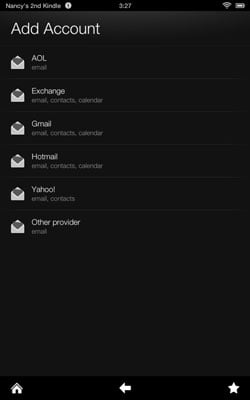
The dialogue box shown appears.

-
Tap AOL, Exchange, Gmail, Hotmail, Yahoo!, or Other Provider.
-
Enter your username, e-mail address, and password in the appropriate fields, and then tap Next.
A new screen appears, displaying two fields.
-
Enter the name that will appear on outgoing messages in the Name field and an address in the E-Mail Address field for your e-mail account.
The account name is optional.
-
Enter the password for your e-mail account in the Password field.
-
Tap the Send Mail from This Account by Default checkbox if you want to set this up as your default e-mail account, and then tap Next.
-
If a message appears about how some accounts sync with your Kindle Fire HD, tap OK to proceed.
-
In the final screen, tap Save and then tap the View Inbox button to go to the inbox for the account you just set up.
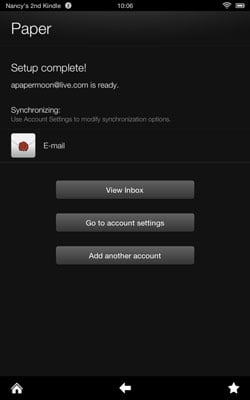
You can set up as many e-mail accounts as you like. When you open the Kindle Fire HD Email app, you see a Unified Inbox that combines messages from all accounts you set up, as well as individual inboxes for each account.

