

Why Are Products & Services Following Me Around The Internet???
Have you found that a product or service that you have looked at on the internet previously seems to be following you around the internet? For example, a shirt that you have been thinking of buying keeps appearing on another site, or a holiday that you have just been looking at keeps popping up on Facebook?
Thanks to an ingenious bit of technology both Google and Facebook offer the ideal way to keep your products and services in the minds of people who have visited your website. This is known as remarketing.
How Does Remarketing Work?
Facebook offers the ideal way to automatically show the right products/services to people who have already expressed interest on your website, in your app or elsewhere on the Internet. This process has been designed to continue working for you for as long as you want – finding the correct people for each product and always using up-to-date pricing and availability.
Introducing The Facebook Pixel
The Facebook pixel (and Google Analytics) is the crucial bit of coding that will allow you to reach your customers and contacts on Facebook.
The Facebook pixel is an analytics tool that allows you to measure the effectiveness of your advertising by understanding the actions that people take on your website.
You can use the pixel to:
-
Make sure that your ads are shown to the right people. Find new customers or people who have visited a specific page or taken a desired action on your website.
-
Drive more sales. Set up automatic bidding to reach people who are more likely to take an action that you care about, such as making a purchase.
-
Measure the results of your ads. Better understand the impact of your ads by measuring what happened as a direct result.
Once you’ve set up the Facebook pixel, the pixel will fire when someone takes an action on your website. Examples of actions include adding an item to their shopping basket or making a purchase. The pixel receives these actions, or “events”, which you can view on your Facebook pixel page in Events Manager.
From there, you’ll be able to see the actions that your customers take and have options to reach those customers again through future Facebook ads.

Further Information
If you’d like to speak to us regarding remarketing, give us a call on 01883 372488 today and we’ll be happy to talk you through your options.
Currently Browsing: Why Are Products & Services Following Me Around The Internet???
Have You Claimed Your New Google Maps Profile Name Yet?
Google My Business has rolled out a brand new feature allowing businesses to create a short name and short URL which will be linked to their Google Maps listing. The feature is designed to give Google My Business accounts a simple way to make their profile on Google Business more accessible to potential customers.
Businesses can use the short URL on materials like business cards, posters, brochures, etc, in order to help customers easily find the business and leave reviews, access contact information, get directions and more.
Create a short name & URL for your business
If you’re a verified business, you can create a short name, or a custom name, for your Business Profile to make it easier for customers to find you.
When you share your short name, customers can enter the short name URL in the browser’s address bar, like “g.page/
How to create a short name
To pick a unique short name, try to use words that represent your business name, brand, location or other description. For example, you can use your business name with your location, like your city or neighbourhood.
Keep your short name simple so you can easily promote it, and customers can remember it.
Computer
- Sign in to Google My Business.
- Open the location you want to create a short name for.
- From the menu, click Info Add profile short name.
- Enter your short name. You can enter up to 32 characters.
- If your name isn’t available, you’ll receive an error message and have to choose a different name. Try abbreviating your name or adding other descriptions, like your location. You can also pick another word that describes your business or brand.
- Click Apply. Your short name will show as pending, and when it’s ready, it’ll show on your Business Profile.
 Add profile short name.
Mobile
- On your phone or tablet, open the Google My Business app .
- Tap Profile Add profile short name.
- Enter your short name. You can enter up to 32 characters.
- If your name isn’t available, you’ll receive an error message and have to choose a different name. Try abbreviating your name or adding other descriptions, like your location. You can also pick another word that describes your business or brand.
- Tap Save. Your short name will show as pending, and when it’s ready, it’ll show on your Business Profile.
 .
.Further Information
If you’d like to speak to us regarding the importance of Google Maps listings, give us a call on 01883 372488 and we’ll be happy to talk you through your options.
Currently Browsing: Have You Claimed Your New Google Maps Profile Name Yet?
Surrey Driving Force Case Study
Surrey Driving Force operates in an extremely competitive industry and approached us to help increase their online visibility through its website and Social Media channels.
It was their goal to rank well for specific industry related keywords in a market which already includes a number of well-established competitors operating with significant online marketing budgets.
In addition to achieving an increase in traffic, they also wanted to improve their online conversions to attract more enquiries.
About Surrey Driving Force
Surrey Driving Force offers first class driving lessons across most of the Surrey area and further afield. Established in 2007, they offer great value for money and the service we provide is second to none.
Their aim is to teach their students to drive safely and confidently in the fewest possible number of lessons whilst creating an enjoyable and stress-free environment.
The Goals
The goals of our client were to increase their overall levels of visibility and enquiries via their website for terms related to ‘driving lessons’, ‘driving schools’, ‘driving instructors’ along with a number of other related key terms for their target locations.
SDF stated that their goal was to be able to achieve high rankings for keywords that would bring a significant amount of traffic to their website and in turn allow them to maximise the conversion rate of web visitors.
The Strategy
Because Surrey Driving Force’s original website was designed in standard HTML, we strongly believed that a re-design incorporating the WordPress CMS would offer the desired results.
Through our extensive research into the market and keywords associated with it, we were able to pinpoint the specific areas and keywords that we would be able to exploit in the search engine rankings. By establishing SDF in the search engine rankings for their chosen products we would be able to bring people to the site with a great chance of converting them from visitors to customers.
It was also important that we enabled SDF to engage with the community. Social media is an important tool in the engineering industry and through a combination of Facebook, Twitter, LinkedIn and a dedicated YouTube channel, we have been able to tap into an online community for the site that would help engage their customers, whilst spreading information related to SDF and their products across social media channels.
Our overall strategy was to increase conversions and traffic through targeting specific keywords where other driving schools’ websites are not as visible, as well as communicating with the community with social media, blogging and product content.
Project Specifications
- Create a new user-friendly website designed to highlight the complete range of SDF’s services using WordPress as the CMS.
- Transfer all existing relevant information from the old site to the new.
- Create a comprehensive Social Media platform, including Facebook, Twitter, LinkedIn and YouTube.
- Implement effective SEO techniques to ensure the website is ‘Google-friendly’.
- Highlight customer testimonials
- Highlight all available services.
- Incorporate a blog which would allow a constant stream of relevant industry information and insight.
Information and Inspiration
We knew that it was important that we designed a website which would grab the reader’s attention from the moment they arrived whilst retaining an air of ‘user-friendliness’.
We, therefore, designed the website to maximise its space and display its information in a clear and readable way whilst retaining the overall feel and aesthetic appeal of their previous website.
We have utilised large, visual tabs and drop down menus on the homepage in order to emphasise the important information available through the website.
Intelligent Styling
As well as having the ability to inform, it is also absolutely essential that we ensure any business website is designed to look and feel relevant to the subject area, so for Surrey Driving Force we kept a high level of continuity by using the existing business colour scheme along with utilising the trade-related imagery to help engage the users with their respective interest and immediately lets them know that they are in the right place.
Search Engine Optimisation
By clearly establishing the areas which SDF wanted to target, we utilised a combination of on-page and off-page techniques to significantly increase the search engine visibility of the website.
SEO Services and Strategies utilised:
- Targeted keyword phrase research using proven SEO keyword tools to identify the best SEO keyword phrases
- Analysis of competitor website SEO strategies to allow for effective targeting of specific keyword phrases
- Applying fully optimised meta-tag standards to all relevant pages
- SEO copywriting current on-page content to ensure effective targeting by Search Engine spiders
- Submission of XML Sitemap to Webmaster Tools format to website core directory
- Introduction of Schema coding to the site
- Creation of Google Maps listing to focus on the target locations
The Results
Since the start of the campaign, we have:
- Increased total visits to the site by over 1600%*
- Increased unique visits to the site by 1000%*
When factoring in the considerable numbers of visitors to the website initially, the increased figures are tremendous.
We have also:
- Obtained increased rankings for all targeted keywords
- Increased Social Media reach significantly with an excellent following on Facebook, Twitter and Instagram
Key Points
- The finished website is excellent and has achieved our goals of creating a site that looks great and performs equally well.
- We re-thought their keyword strategy.
- Implementation of steps to maximise the conversion rate of their web traffic.
- We attained top 10 rankings across the portfolio of keywords over a 6 month period.
- They are still a very happy client of ours to this day.
Below are just a small sample of the high ranking key terms that we have obtained for Surrey Driving Force.
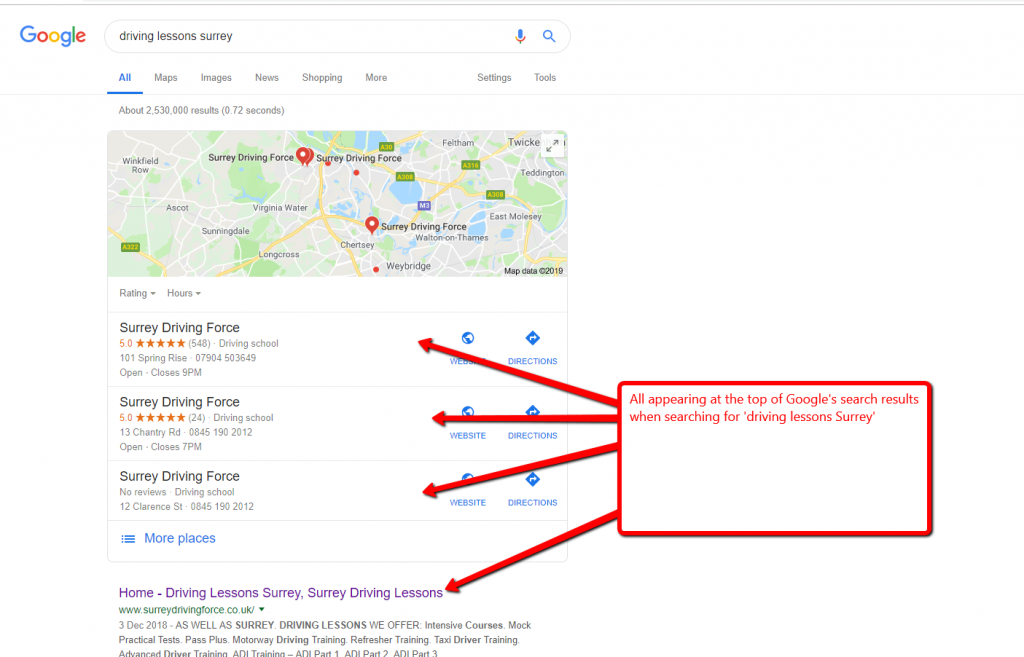
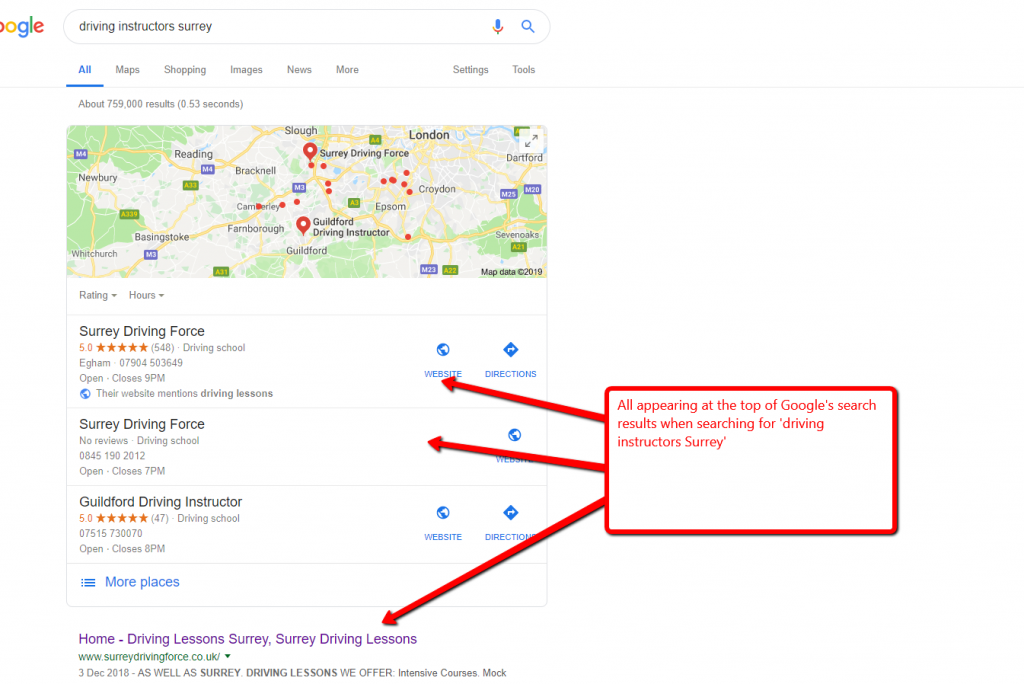
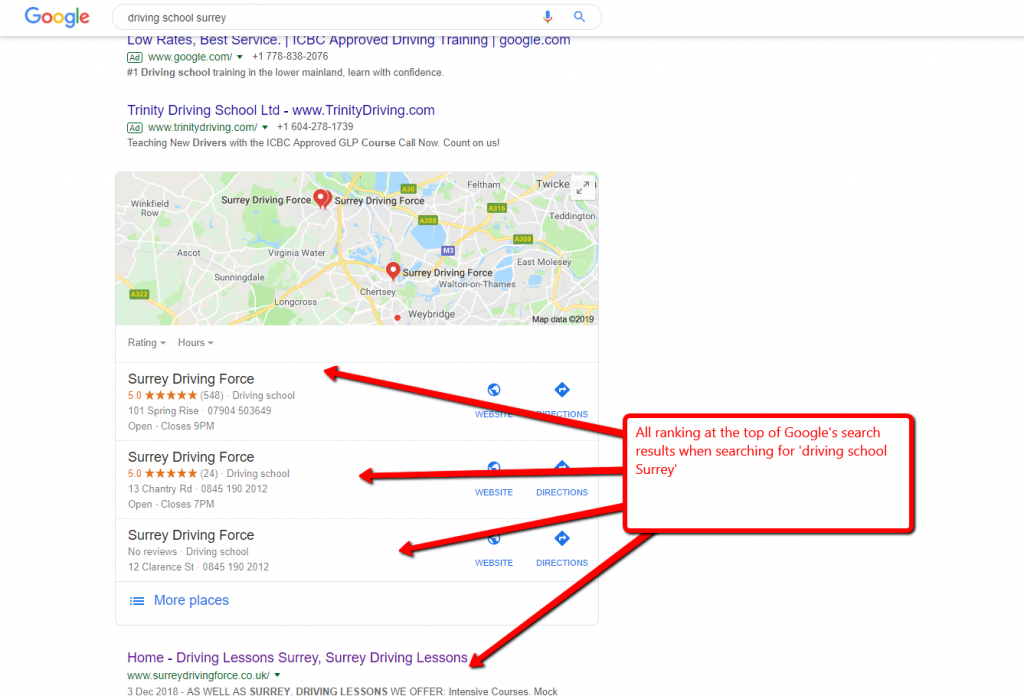
By optimising and integrating the existing information used on the original Surrey Driving Force website into the detailed plan of action, we were able to create a quality online solution tailored specifically to the needs of SDF.
The details provided on the website are accurate, easy to read and form a comprehensive overview of the services available. Initial results have been hugely positive with the number of visitors coming to the website increasing on a monthly basis along with some excellent feedback from customers.
We Can Help With Your Online Marketing
- Would you like to maximise the potential of your website?
- Do you want to see your site create more sales and revenue for you and your company?
- Do you want to be ranking for competitive keywords that can help your business grow online?
Our extensive knowledge of SEO and Online Marketing, in general, can help you improve your own search engine position to bring you better sales and traffic.
Further Information
Footprint Digital has been at the forefront of web design and development for over 20 years. If you are looking for a website that truly represents your business, or advice on how to make your site stand out, then contact us today on 01883 372 488, or via email at info@footprint.co.uk.

